Syncing External Provider Data with Sitecore XM Cloud Using Next.js
Wednesday, May 6, 2026
The Use Case
Imagine you have an external API that returns a list of "active providers" - these could be healthcare professionals, vendors, partners, or any type of entity relevant to your business. Your goal is to reflect this data inside Sitecore XM Cloud so content editors and front-end experiences can use it seamlessly.
Rather than manually entering or updating providers in Sitecore, you automate the process.
Why Next.js as the Middle Layer?
Next.js plays a key role here as an orchestration layer between your external API and Sitecore XM Cloud. Here's why it fits well:
Server-side capabilities
You can securely fetch data and interact with Sitecore APIs.
API routes: Useful for triggering sync jobs or handling webhooks.
Flexibility: Works well with headless CMS patterns like Sitecore XM Cloud.
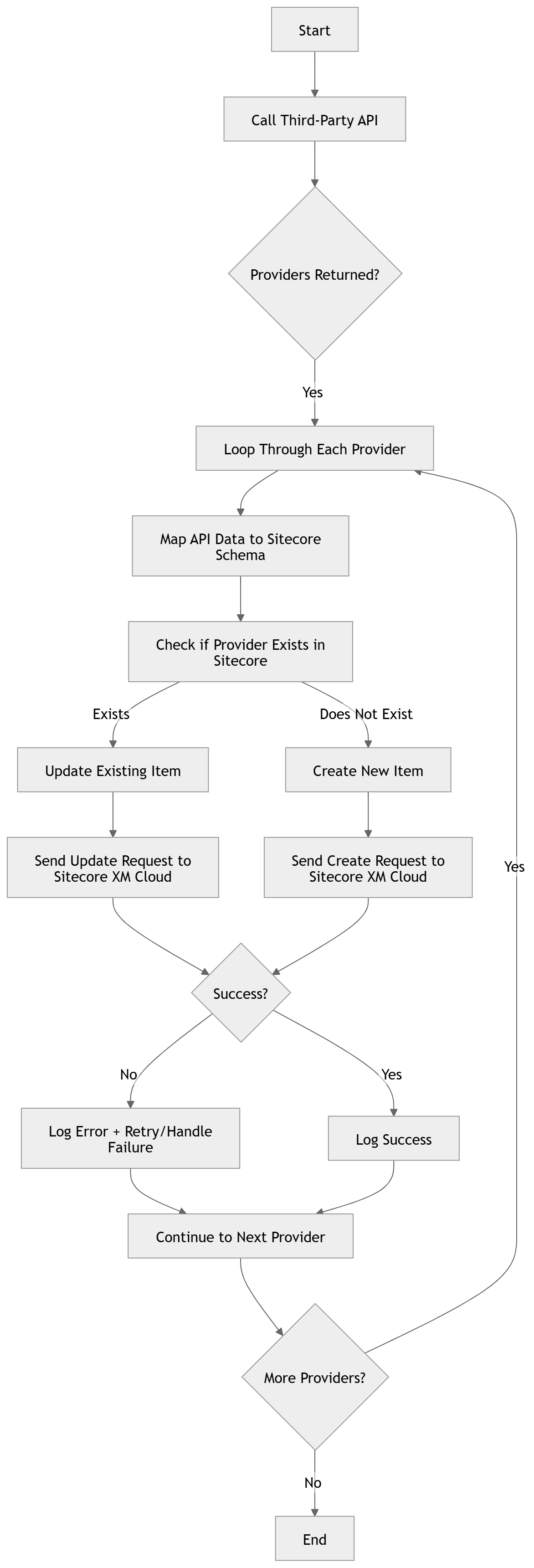
High-Level Architecture
1. External API
Provides a list of active providers (JSON payload).
2. Next.js Application
Fetches provider data..
Transforms it into the structure expected by Sitecore.
Sends requests to Sitecore XM Cloud to create or update items.
3. Sitecore XM Cloud
Stores each provider as a content item, making it available for rendering in your front-end experience.
Flow-chart
Implementation Breakdown
1. Fetching Providers
You can create a utility function in Next.js to fetch provider data:
export async function fetchProviders() {
    const res = await fetch(process.env.PROVIDER_API_URL);
    if (!res.ok) {
        throw new Error('Failed to fetch providers');
    }

    return res.json();
}
2. Mapping Data to Sitecore Format
Sitecore items typically require specific fields and structure. You'll want to map your provider data accordingly:
function mapProviderToSitecoreItem(provider) {
    return {
        name: provider.name,
        fields: {
            ProviderId: provider.id,
            Specialty: provider.specialty,
            Location: provider.location,
            Active: provider.active
        }
    };
}
3. Creating Items in Sitecore AI
Using Sitecore's Management API (or Content Management API), you can programmatically create items:
sync function createSitecoreItem(item) {
    const res = await fetch(process.env.SITECORE_API_URL, {
        method: 'POST',
        headers: {
            'Content-Type': 'application/json',
            Authorization: Bearer {{ process.env.SITECORE_API_KEY }}
        },
        body: JSON.stringify(item), });
        if (!res.ok) {
            throw new Error('Failed to create Sitecore item');
        }
    return res.json();
}
4. Putting It All Together
You can expose an API route in Next.js to trigger the sync:
export default async function handler(req, res) {
  try {
    const providers = await fetchProviders();

    for (const provider of providers) {
      const item = mapProviderToSitecoreItem(provider);
      await createSitecoreItem(item);
    }

    res.status(200).json({ message: 'Providers synced successfully' });
  } catch (error) {
    res.status(500).json({ error: error.message });
  }
}
Result

Benefits of This Approach
Eliminates manual data entry
Keeps Sitecore content in sync with external systems
Enables dynamic, scalable content management
Maintains a clean separation between data source and presentation
Thoughts...
This pattern-using Next.js as a bridge between an external API and Sitecore XM Cloud-opens the door to powerful integrations. It allows you to treat Sitecore not just as a CMS, but as a centralized content hub that reflects real-time business data.
As your system grows, you can extend this approach to support more complex workflows, richer data transformations, and event-driven architectures.
Next steps to enhance the functionality
Scaling & Batch Processing
Use batch processing techniqure if you are processing huge number of items per sync.Idempotency
Avoid duplicate items by checking if a provider already exists in Sitecore.Updates vs Creates
Use PATCH or PUT for existing items.Scheduling
Trigger sync jobs using cron or serverless schedulers.Error Handling & Logging
Essential for production reliability.Rate Limiting
Respect both your API and Sitecore limits.